4 Home Office Desk Setup Essentials for Comfort and Focus
Disclosure: As an Amazon Associate we earn from qualifying purchases. Product links on this page go to Amazon and are affiliate links, so we may earn a commission at no extra cost to you. We do not list prices because they change often; use the buttons to check the current price.
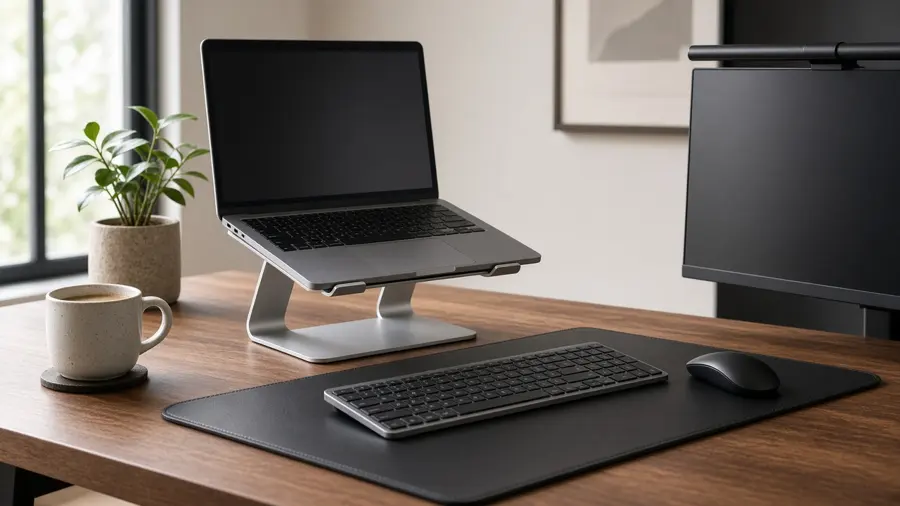
Working from home is easier on your body and your focus when the desk is set up properly. Most people start with a laptop on the kitchen table and slowly notice the cost: a sore neck from looking down, tired eyes from a dim corner, and a cramped keyboard. The fix does not require an expensive standing desk or a full renovation. Four small upgrades solve most of it.
This guide covers the home office desk setup essentials we would buy first. Each product is highly rated by thousands of buyers, and we checked every rating and rating count on Amazon on the date above. We do not quote prices, so use the buttons to check the current price.
At a glance: our picks compared
| Product | Best for | Amazon rating | Price |
|---|---|---|---|
| Nulaxy Ergonomic Adjustable Laptop Stand | Raising a laptop to eye level and easing neck strain | 4.7/5 (16,968 ratings) | Check price |
| Quntis Monitor Light Bar with Auto-Dimming | Glare-free desk lighting without a bulky lamp | 4.6/5 (13,907 ratings) | Check price |
| Logitech MK335 Quiet Wireless Keyboard and Mouse Combo | Quiet, reliable typing with a separate keyboard and mouse | 4.4/5 (9,902 ratings) | Check price |
| Aothia PU Leather Desk Pad (23.6 x 13.7 in) | Protecting the desk and giving the mouse a smooth surface | 4.6/5 (79,651 ratings) | Check price |
1. Best for posture: Nulaxy Ergonomic Adjustable Laptop Stand
Rated 4.7 out of 5 by 16,968 Amazon shoppers (checked October 30, 2026). Price: check current price on Amazon.
Why we like it
The single biggest ergonomic upgrade for a laptop user is raising the screen. The Nulaxy stand lifts the laptop toward eye level, which Nulaxy says reduces neck, shoulder and spinal fatigue during long hours of typing and video calls. Its dual-rod support mechanism spreads the weight to keep the stand steady, and it is rated for devices up to 22 lbs.
It fits laptops from 10 to 16 inches, including MacBook Pro and Air, Dell XPS, HP, Lenovo and ASUS models. Anti-slip silicone pads hold the laptop in place and protect it from scratches, and a vented top panel improves airflow. When you are done, the dual-foldable design collapses flat so it can go into a backpack for a café or a business trip.
Who it's for
Anyone working from a laptop all day, hybrid workers who move between home and office, and students who study for long stretches.
Pros
- Raises the screen for better posture
- Stable dual-rod design rated up to 22 lbs
- Vented panel for airflow
- Folds flat for travel
Cons
- You will need a separate keyboard and mouse once the laptop is raised
- Very large gaming laptops near the top of the size range may feel less compact
2. Best desk lighting: Quntis Monitor Light Bar with Auto-Dimming
Rated 4.6 out of 5 by 13,907 Amazon shoppers (checked October 30, 2026). Price: check current price on Amazon.
Why we like it
A monitor light bar is one of those upgrades you do not appreciate until you have it. It sits on top of your screen, takes no desk space, and lights the desk without bouncing glare off the monitor. Quntis uses an asymmetrical optical design to aim light only at the desk area and a weighted clip to mount on top of the screen.
It is packed with thoughtful details. A built-in ambient light sensor auto-dims to keep the desk at around 900 lux, and you can also dim it smoothly by touch. Quntis says it is flicker-free, certified to blue light safety standards, and uses 78 LED beads with a Ra98 color rendering index for natural-looking light. It is powered over USB.
Who it's for
Anyone working in a dim room or at night, people who get tired eyes from screens, and small desks with no room for a lamp.
Pros
- Takes zero desk space
- Asymmetric design avoids screen glare
- Auto-dimming plus touch dimming
- Flicker-free with high color rendering
Cons
- Clip fit depends on your monitor's shape, so check thin or curved screens
- Lights the desk, not the whole room
3. Best keyboard and mouse: Logitech MK335 Quiet Wireless Keyboard and Mouse Combo
Rated 4.4 out of 5 by 9,902 Amazon shoppers (checked October 30, 2026). Price: check current price on Amazon.
Why we like it
Once your laptop is raised, a separate keyboard and mouse are a must. The Logitech MK335 is a full-size combo with low-profile, whisper-quiet keys, so typing during calls or late at night will not annoy anyone else in the house. Logitech's 2.4 GHz wireless connection uses a single plug-and-forget nano receiver.
Battery life is a highlight. Logitech says the keyboard can go up to 24 months and the mouse up to 12 months before you change batteries, though results vary with use. There are also 11 hot keys plus 4 programmable F-keys for media and shortcuts, and the mouse is ambidextrous.
Who it's for
Laptop users with a stand, shared households where noise matters, and anyone who wants a full-size layout without spending much.
Pros
- Quiet, low-profile keys
- Full-size layout
- Long battery life
- One nano receiver for both devices
Cons
- Runs on replaceable batteries rather than a rechargeable battery
- Basic mouse with no extra side buttons
4. Best desk mat: Aothia PU Leather Desk Pad (23.6 x 13.7 in)
Rated 4.6 out of 5 by 79,651 Amazon shoppers (checked October 30, 2026). Price: check current price on Amazon.
Why we like it
A desk pad sounds like decoration, but it does real work. The Aothia pad protects your desk from scratches, spills, heat and scuffs, and gives your mouse a smooth surface. At 23.6 x 13.7 inches, it fits a laptop or keyboard and mouse. The PU leather is water-resistant and wipes clean with a damp cloth.
The back has a suede finish that adds friction so the pad stays put while you work. It also gives a plain desk a tidy, professional look on video calls. With nearly 80,000 ratings, it is one of the most popular desk pads on Amazon, and Aothia offers a one-year warranty.
Who it's for
Anyone with a wood or laminate desk they want to protect, people who use a mouse all day, and anyone who wants a cleaner-looking workspace.
Pros
- Protects the desk from spills and scratches
- Smooth surface for writing and mousing
- Non-slip suede back
- Wipes clean
Cons
- 23.6 inches wide may be short for a full keyboard plus a wide mouse area; larger sizes exist
- PU leather rather than genuine leather
How to set up an ergonomic home office
- Top of the screen at eye level: your eyes should land near the top third of the screen while you sit tall. A laptop stand or monitor riser gets you there.
- Elbows at about 90 degrees: keep the keyboard close and low enough that your shoulders stay relaxed.
- Light the desk, not the screen: place light so it does not reflect off the monitor. A light bar or a lamp to the side works best.
- Feet flat: adjust chair height so your feet rest on the floor, or add a footrest.
- Move often: stand up, stretch and look away from the screen every 30 to 60 minutes.
Small upgrades that add up
After these four basics, the next improvements are a supportive chair, simple cable management (adhesive clips or a cable tray), and a dedicated spot for a phone and notebook. Keep the desk surface as clear as possible. A tidy desk is easier to clean and easier to focus at, and it looks better on camera.
Frequently asked questions
What do I need for a basic home office setup?
A desk and supportive chair, a way to put your screen at eye level (a laptop stand or monitor), a separate keyboard and mouse, good lighting, and a reliable internet connection. A desk pad and simple cable management finish the setup.
Do I need an external keyboard with a laptop stand?
Yes. Once the laptop is raised to eye level, its built-in keyboard is too high to type on comfortably, so pair the stand with a wireless keyboard and mouse such as the Logitech MK335.
Will a monitor light bar cause glare on my screen?
A good one should not. Quntis says its light bar uses an asymmetrical optical design that only lights the desk area, so the light does not reflect off the screen.
How much weight can the Nulaxy laptop stand hold?
The listing says its dual-rod design supports devices up to 22 lbs (10 kg), and it fits laptops from 10 to 16 inches.
How big is the Aothia desk pad?
The listed size is 23.6 x 13.7 inches, which is large enough for a laptop or keyboard plus a mouse.
The bottom line
Start with the Nulaxy laptop stand and the Logitech MK335 combo. Together they fix the posture problem that causes most work-from-home aches. Add the Quntis light bar if you work in a dim room or late at night, and finish with the Aothia desk pad to protect your desk and pull the setup together.
Related reading: smart home gadgets worth buying and small apartment organization ideas.
As an Amazon Associate we earn from qualifying purchases. Ratings were checked on October 30, 2026; prices and availability change, so check Amazon for current details.