Desk Cable Management Ideas: 5 Highly Rated Fixes for a Tidy Home Office
Disclosure: As an Amazon Associate we earn from qualifying purchases. Product links on this page go to Amazon and are affiliate links, so we may earn a commission at no extra cost to you. We do not list prices because they change often; use the buttons to check the current price.
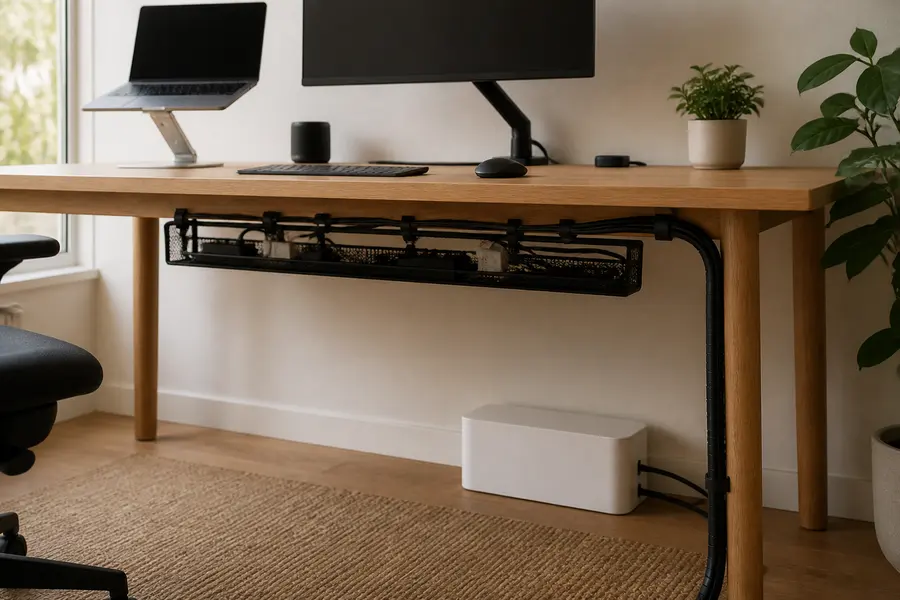
Messy cables are the one thing that makes even a beautiful home office look unfinished. A tangle of chargers, a power strip on the floor and a waterfall of cords behind the monitor add visual noise, collect dust and are easy to kick loose in the middle of a video call. The good news is that desk cable management does not take special skills, tools or a big budget. A few simple pieces turn the mess into one or two clean lines.
We picked five highly rated products that each solve a different part of the problem: where the power strip lives, how cords travel down to the wall, how extra length is bundled and how your everyday charging cables stay in reach. We checked every rating, rating count and stock status on Amazon on the date above. We do not quote prices, so use the buttons to check the current price. If you are setting up a desk from scratch, pair this guide with our home office desk setup essentials.
At a glance: our picks compared
| Product | Best for | Amazon rating | Price |
|---|---|---|---|
| Litwaro No-Drill Under Desk Cable Management Tray | Lifting the power strip and chargers off the floor, no drilling | 4.7/5 (3,489 ratings) | Check price |
| D-Line Large Cable Management Box | Hiding a power strip that has to stay on the floor | 4.5/5 (7,357 ratings) | Check price |
| Alex Tech 10 ft 1/2-Inch Split Cable Sleeve | Turning the cords from desk to wall into one neat line | 4.7/5 (85,570 ratings) | Check price |
| Nettbe Reusable Cable Ties, 60-Pack | Bundling extra cord length you can re-adjust later | 4.8/5 (14,899 ratings) | Check price |
| SOULWIT Adhesive Cable Management Clips, 50 Pcs | Routing charging cables along the desk edge or wall | 4.6/5 (12,513 ratings) | Check price |
1. Best overall: Litwaro No-Drill Under Desk Cable Management Tray
Rated 4.7 out of 5 by 3,489 Amazon shoppers (checked November 3, 2026). Price: check current price on Amazon.
Why we like it
The single most effective cable management idea is to get the power strip off the floor and up under the desk. Once it is there, every plug is short, nothing trails across the floor, and only one cord needs to run to the wall. This metal mesh tray clamps onto the edge of the desk, so there is no drilling. The listing says it can be assembled in about three minutes and installed facing inward or outward.
It is made of carbon steel, holds about 15 lbs according to the listing, and has two holes on each side so cables can pass through freely. The clamps have soft rubber pads to protect your desk from scratches, and the open mesh design is less likely to collect dust. It fits desks with a flat edge from 0.4 to 2.4 inches thick.
Who it's for
Renters, anyone with a nice desk they do not want to drill into, and anyone whose power strip, USB hub and laptop brick currently sit on the floor.
Pros
- No-drill clamp mount with rubber pads
- Holds a power strip, chargers and adapters
- Cable holes on both sides
- Open mesh stays cleaner than a solid box
Cons
- Only fits flat desk edges 0.4 to 2.4 inches thick
- Lesser-known brand than VIVO or D-Line
2. Best for the floor: D-Line Large Cable Management Box
Rated 4.5 out of 5 by 7,357 Amazon shoppers (checked November 3, 2026). Price: check current price on Amazon.
Why we like it
Sometimes the power strip has to stay on the floor, for example behind a desk that sits against an outlet or under a standing desk where the strip powers more than the desk. A cable management box hides it completely. The D-Line box is designed to hold popular-sized power strips plus excess cord, with three rear entry and exit slots so cables leave neatly. The listing says it is made in the UK from electrically safe ABS plastic, and the curved edges help it blend in.
It also has a safety benefit the listing points out: with the strip inside, the electrics are less accessible to curious pets and young children, and there is less of a trip hazard. The outside dimensions are 16.5 x 6.5 x 5.25 inches, so measure your power strip first.
Who it's for
Anyone with kids or pets, and anyone whose outlet is far from the desk or who needs the strip on the floor.
Pros
- Hides a power strip and spare cord completely
- Three rear cable slots
- Keeps plugs away from pets and toddlers
- Also works for a TV stand or Christmas lights
Cons
- Check your strip fits the 16.5-inch box before buying
- Still takes up floor space
3. Best for cords down the leg: Alex Tech 10 ft 1/2-Inch Split Cable Sleeve
Rated 4.7 out of 5 by 85,570 Amazon shoppers (checked November 3, 2026). Price: check current price on Amazon.
Why we like it
Even with a tray, you will have a few cords that run from the desk to the wall: the power strip cord, an Ethernet cable, maybe a monitor cable. A split sleeve turns those into one neat black line. This wire loom is split along its length, so you just push the cords in, and the listing says it closes on itself once loaded. You get 10 feet of 1/2-inch sleeve, which is enough for a standing desk leg or two shorter runs.
The listing also says it is UL Recognized and helps keep cats from chewing cables, which is a nice bonus for pet owners.
Who it's for
Standing desk owners, anyone whose desk sits away from the wall, and pet owners with chewers.
Pros
- Split design, easy to load and unload
- 10 feet you can cut to length
- Helps protect cords from pets
- Very highly rated by a huge number of buyers
Cons
- 1/2-inch diameter holds only a few thick cords; bigger bundles need the 1-inch size
- Adds a visible black line, so it suits darker desks best
4. Best for bundling: Nettbe Reusable Cable Ties, 60-Pack
Rated 4.8 out of 5 by 14,899 Amazon shoppers (checked November 3, 2026). Price: check current price on Amazon.
Why we like it
Every cord has extra length, and that slack is what creates the spaghetti look. Reusable hook-and-loop ties let you fold the extra length and strap it, then re-open the strap when you move a device. The listing describes them as a practical alternative to one-time zip ties that you can wrap, adjust and reopen many times with no tools. A 60-strap pack is enough for your desk, your TV setup and spares.
Who it's for
Everyone. This is the cheapest, most flexible upgrade in the guide.
Pros
- Reusable, no cutting needed
- 60 straps in the pack
- Works for desk, TV and travel cords
- Top-rated pick in this guide
Cons
- Check the strap size before ordering
- They bundle cords but do not hide them
5. Best for charging cables: SOULWIT Adhesive Cable Management Clips, 50 Pcs
Rated 4.6 out of 5 by 12,513 Amazon shoppers (checked November 3, 2026). Price: check current price on Amazon.
Why we like it
The cables you actually touch every day, like phone and laptop chargers, keep sliding off the desk and disappearing behind it. Adhesive clips solve that. You stick them to a clean surface, open the tab, drop in several cables and close it. The listing says they work on desks, walls, cabinets, wood, ceramics and metal, and the 50-piece pack means you can also route cables along the wall or under the desk to the tray.
Who it's for
Anyone who loses their charging cable behind the desk, and anyone running cables along a wall.
Pros
- Holds several cables per clip
- Opening tab makes cables easy to remove
- Sticks to many clean surfaces
- 50 pieces for multiple rooms
Cons
- Adhesive needs a clean, smooth surface
- Visible on the desk edge, so place them on the back
How to manage desk cables in 30 minutes
- Unplug and sort. Pull everything out, decide what stays on the desk, and remove cables you no longer use.
- Mount the tray. Clamp the tray under the back of the desk and put the power strip, USB hub and power bricks in it.
- Plug in from above. Plug each device into the strip in the tray, keeping cords short.
- Bundle the slack. Fold extra length and strap it with reusable ties inside the tray.
- One line to the wall. Run the remaining cords down a desk leg inside the split sleeve.
- Clip the daily cables. Add a few adhesive clips at the back edge for phone and laptop chargers.
If you also spend hours at the desk, our guide to ergonomic home office accessories for back pain is the natural next step.
Buying tips
- Measure first. Check your desk edge thickness for a clamp tray and your power strip size for a cable box.
- Tray or box? Use a tray if you can lift the strip off the floor; use a box if it must stay on the floor.
- Plan for change. Choose reusable ties over zip ties so adding a new device takes seconds.
- Clean before you stick. Wipe surfaces before using adhesive clips so they hold.
- Leave some slack. Standing desks need enough cord length to move up and down without pulling plugs.
Frequently asked questions
How do I hide cables on my desk without drilling?
Use a clamp-on under-desk tray for the power strip and chargers, then bundle the rest with reusable hook-and-loop ties and adhesive clips. The Litwaro tray clamps onto desk edges from 0.4 to 2.4 inches thick, so no screws are needed.
What is the easiest way to manage cables under a desk?
Get the power strip off the floor first. Once it sits in an under-desk tray, every plug is short and close to the desk, and only one power cord has to run down to the wall outlet.
Are cable management boxes safe for power strips?
The D-Line box is made from electrically safe ABS plastic, according to the listing, and is designed to hold popular-sized power strips. Check your strip's size against the box's 16.5 x 6.5 x 5.25 inch outside dimensions, and do not pack it so tightly that cords are crushed.
Velcro ties or zip ties for cable management?
For a desk, reusable hook-and-loop ties are usually the better choice. You will add and remove devices over time, and hook-and-loop straps reopen without cutting, while zip ties have to be snipped and replaced.
How do I stop cables from falling behind my desk?
Stick a few multi-cable clips along the back or top edge of the desk and park your charging cables in them. The SOULWIT clips have an opening tab, so you can lift a cable out to use it and drop it back in when you are done.
The bottom line
For most home offices, the Litwaro No-Drill Under Desk Cable Management Tray makes the biggest difference, because getting the power strip off the floor fixes most of the mess at once. Add Nettbe reusable ties for the slack and an Alex Tech split sleeve for the cords to the wall, and your desk will look clean from every angle. If your strip must stay on the floor, the D-Line box hides it neatly.
Related reading: work from home gifts and home office desk setup essentials.
As an Amazon Associate we earn from qualifying purchases. Ratings were checked on November 3, 2026; prices and availability change, so check Amazon for current details.